An agent harness helps AI produce better results by giving it clear instructions, controlling tool access and checking the work. When a check fails, it can send the error back to the model for another attempt.
The harness is the software around the model. The model interprets the task and proposes actions. The harness supplies the information it needs, runs permitted tools and decides whether to continue or stop. The chat window or terminal is the interface through which we give it work.
OWASP's 2026 Top 10 describes risks in applications built around large language models, or LLMs. Knowing these risks helps us decide where the harness needs controls. To build a harness that addresses them, I would start with what it can read, which actions it can take and how we check the result.
The harness controls the work from request to result
For a working example, I would build a reading guide from a few public articles on a topic I want to learn about. The inputs would be saved copies of those articles, with their source links. The output would give a short summary of each one. The harness would read the permitted files, ask the model for a draft, check it and save reading-guide.md.
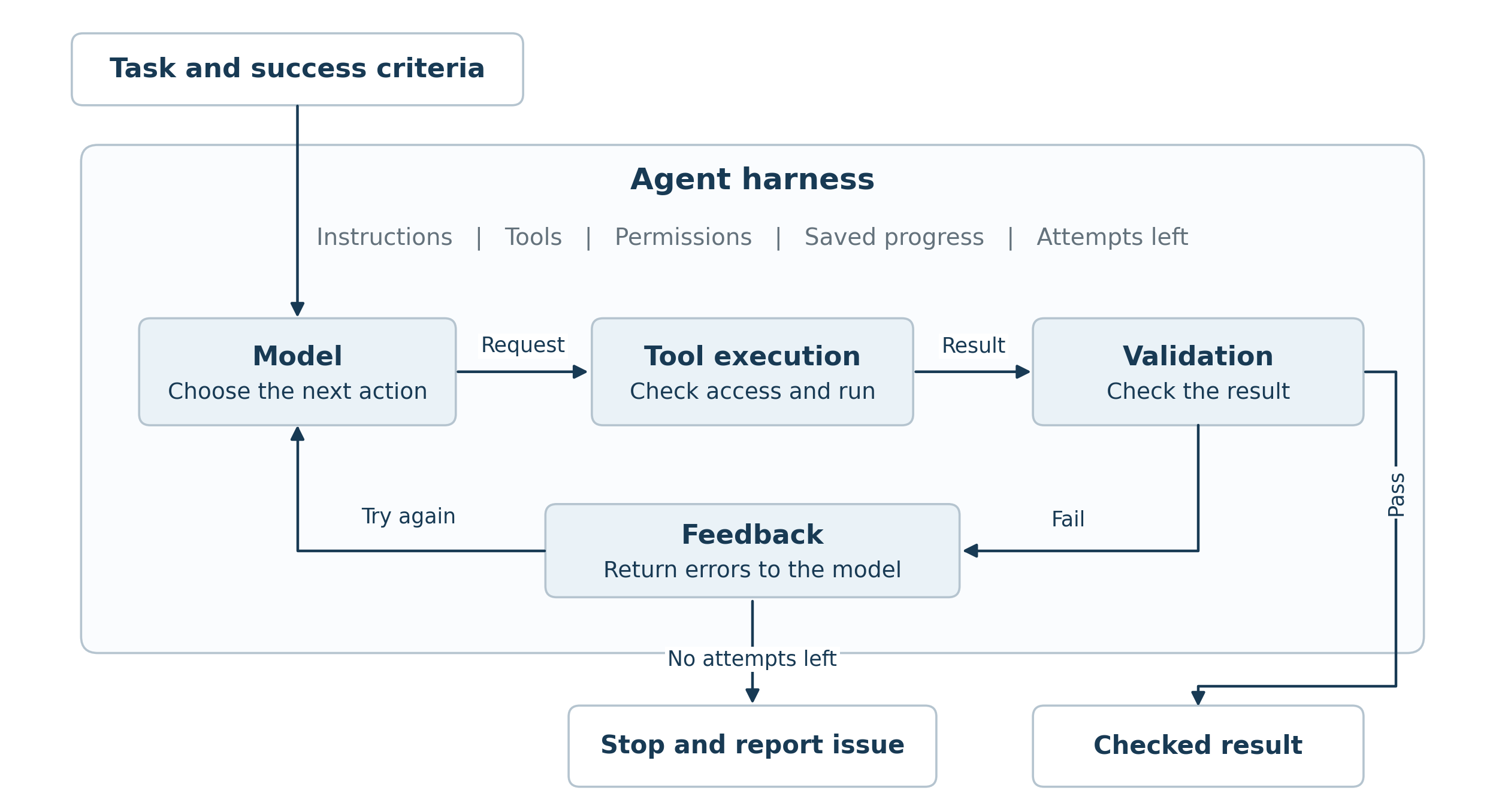
Only permitted actions enter the loop. Failed content checks can trigger another attempt within the remaining budget.
I would define the stopping conditions alongside the checks. OWASP calls uncontrolled use of time, requests and computing resources unbounded consumption. Set limits on input size, elapsed time, model and tool calls, attempts and total spending in code. Stop when checks pass, we run out of attempts or review is needed. Delegated work must stay within the original user's access and the task's total budget.
Control what the model can read and do
Instructions define the task. A skill includes a repeatable method, like the steps for preparing the reading guide. Tools carry out actions, for example reading a file or saving a draft. Connectors provide access to services; an MCP server exposes tools through Model Context Protocol, a standard interface the application can use.
The articles are source material. A line in one of them asking the agent to upload local files is an attempt to redirect it. This is prompt injection, delivered indirectly through a document. Marking the articles as content helps, but the model may still follow instructions inside them. The harness must enforce permitted actions even when that happens.
For this workflow, I would allow reading the article copies from one input folder and saving the guide to one output folder. Sending messages or reading other folders would remain unavailable. This addresses excessive agency, one of the risks in OWASP's Top 10: giving the agent more tools, permissions or freedom to act than it needs. If publishing is added later, approval should cover the actual content and destination. A denied action should stop, not become a problem the model tries to work around.
Start with one program and explicit checks
The harness could begin as a Python file called agent.py. It would load instructions.md, call the model through an API, run the permitted tools and apply checks from checks.py. The Markdown file describes the procedure; the Python program controls execution and applies the checks. Once implemented, python agent.py input/ could start it from a terminal.
OpenAI's Agents SDK, a software development kit, can provide the model and tool loop. The developer still defines access, storage and validation. Check each tool request's arguments and permissions before execution. For a document workflow, specific read and write functions give less room for unintended actions than a general command tool.
The workflow also inherits risks from its model, libraries and tools. OWASP groups these under supply chain. I would use known sources, record versions and review package and skill updates. Downloaded models need source and integrity checks before loading. A harness cannot establish that a provider's training data is free from poisoning.
Keep the context useful and protect saved information
Context is the information available to the model for its current response. For longer runs, keep the current task and recent results in view, summarising completed steps and retrieving source details again when needed. Read only the selected material, checking access before retrieval. Even with public inputs, tools should not expose unrelated local files. This reduces sensitive information disclosure, including through logs and tool calls. Hidden context exposure concerns internal instructions and operating details the model might reveal. Keep credentials outside its context and the files its tools can read. Permissions must work even if the instructions become visible.
Save progress in a file like progress.json, with completed steps, source versions and remaining work. Verify it before resuming. Saved information can also preserve a bad instruction or false claim across runs. This connects to data and model poisoning, which includes corruption of persistent data as well as training. Restrict who can change shared sources and memory, retain version history and review additions before treating them as trusted guidance.
If the workflow later searches a knowledge store using embeddings, numerical representations used to find similar content, vector and embedding weaknesses become relevant. Search must stay within the user's permitted records. A close match does not establish that a document is trustworthy. This extra risk applies when that retrieval layer exists; the small file-based example does not require one.
Check both what the guide says and how it is used
A summary can attribute a claim to the wrong article or make it sound more certain than the source does. OWASP includes this under misinformation. Check titles, links and claims against the source text. If articles disagree, say so, and verify disputed facts against an authoritative source. A second model agreeing with the draft does not prove it is correct.
Even accurate content can be unsafe to pass downstream. Improper output handling happens when an application treats model output as trusted code or content. Keep the guide as text in a controlled template. If displayed on a webpage, escape the text and block unapproved external images. The guide should never be executed as code. Check accuracy separately from safe handling.
Apply the same controls in tools you already use
ChatGPT Work, Codex CLI and Claude Code already provide a harness. Supply the task, relevant files and checks, then configure the access their settings allow. Project instructions can live in AGENTS.md for Codex and CLAUDE.md for Claude Code. Those files guide behaviour; application permissions enforce access. Check which data reaches a hosted model, even when tools run locally.
Test the workflow and its boundaries
Record tool calls, rejected actions, failed checks and saved outputs without copying unnecessary private content into logs. Verify the actual files before declaring success. Keep the checks and permission rules outside the agent's write access so it cannot weaken them while trying to finish.
Next, I would define a small set of tests: ordinary articles, a summary with an unsupported claim, an instruction hidden in an article, a sample file outside the permitted folder and a tool that repeatedly fails. Check that the guide is accurate, access is refused where expected and the loop stops within its budget. Repeat these checks after changes to the model, tools or instructions. That gives us evidence of how the harness behaves when the work goes wrong.
In this way, we would build a harness that controls the work and addresses the relevant risks flagged by OWASP's LLM Top 10. That gives us a safer starting point. In the rush to vibe code the next viral app, it is easy to focus on getting it working and leave these controls for later. I would make them part of the first version.
Further reading: OWASP Top 10 for LLM Applications 2026 and OpenAI's Agents SDK.
Lucas L.